For businesses and bookkeepers on Xero
Send each Xero invoice and its attachments as one PDF
One invoice. One PDF. Nothing bounced.
Your customer's accounts payable team wants a single PDF with the timesheets, receipts, delivery notes and site photos stuck on. InvoicePack builds it for you the moment you approve the invoice in Xero, and emails it.
14-day free trial. No card. Set up in about 5 minutes.
Xero sends attachments as separate files. Portals want one.
Today you download the invoice, paste it together with the backup in a PDF tool, and email it from Outlook. Forget once and the invoice is rejected, and you wait another payment cycle. We do that step for every invoice, automatically.
Built to help the hundreds of Xero users who need a better way to send attachments with their invoices.
Who InvoicePack is for
Contractors and labour hire
You send timesheets with every invoice, often to a portal that takes one file. They go out as one PDF, every time.
Trades and field services
Site photos and delivery dockets stay attached to the invoice they belong to, so the customer can pay without calling you.
Bookkeepers
You send invoices for several clients. Connect each Xero organisation and set its rule once. Each organisation is $19 a month.
How it works
Step 1: Connect your Xero organisation
Sign in with Xero and pick the company. We never see your password.
Step 2: Choose who gets a combined PDF
All customers, or just the ones you tick. Send yourself a sample to check it.
Step 3: Approve invoices as usual
Click Approve and your customer gets one combined PDF from us, with a copy saved on the invoice in Xero. Click Approve & email and Xero sends its own email as before, and we also send the complete PDF.
What your customer receives: one PDF, invoice first
The invoice first, with your Xero branding. Then every attachment, in the order they are in Xero. Photos are rotated and fitted to the page. Pictured: illustrative example.
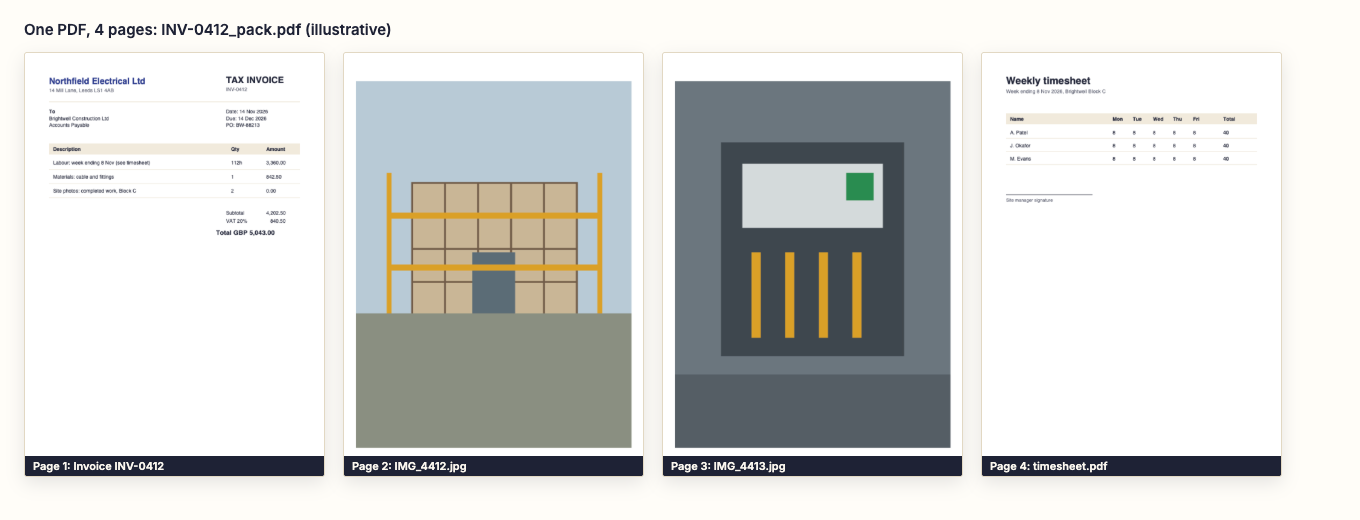
Works with PDF, JPG and PNG attachments. Other file types are skipped, and you are told which.
The honest comparison
| Topic | Doing it by hand | InvoicePack | A full credit-control suite |
|---|---|---|---|
| Time per invoice | 3 to 10 minutes | 0. It happens on approval | 0, after setup |
| Setup | None | About 5 minutes | Longer: reminders, templates, rules |
| Price | Your time | $19/month per Xero organisation | Starts higher, priced for the whole suite |
| Payment reminders and chasing | Manual | Not included. One job only. | Yes. This is what they are built for. |
| Right for you if | You send a few a month | You send dozens with backup and want it done | You also want late payments chased |
Simple pricing
$19/month
per Xero organisation
- 14-day free trial, no card
- Unlimited combined PDFs
- Automatic and bulk sending
- Download the PDF without sending
- Cancel any time
Founding price: $19/month, locked in for as long as you stay subscribed on the plan you start with. Switching between monthly and yearly ends it. Details
Billed in USD by Stripe.
Start free trialOr $190/year. No VAT charged.
Questions about Xero attachments and InvoicePack
Can Xero send an invoice and its attachments as one PDF?
Not today. Xero sends the invoice PDF and each attachment as separate files. InvoicePack combines them into one PDF and sends it when you approve the invoice.
Why does my customer's accounts payable portal reject my Xero invoices?
Many accounts payable portals and inbox scanners expect one PDF per invoice. When the timesheet or photos arrive as separate files, they can be dropped and the invoice sent back for missing backup. One combined PDF avoids that.
Do I still need to tick “Attach file(s) to email” in Xero?
No. We attach the combined PDF ourselves and send it. If you would rather send from Xero, choose “only attach” on the Rule page, then in Xero's email window tick ‘Attach file(s) to email’ and untick ‘Attach PDF to email’.
Does it work with receipts from billable expenses?
We combine the files attached to the invoice itself. Receipts that sit only on the bill or expense are not copied across today, so attach them to the invoice in Xero and they will be in the PDF.
Does it change my invoices in Xero?
No. We add the combined PDF as one more attachment on the invoice and mark it as sent. Your invoice and your branding theme stay as they are.
What if an attachment is a Word or Excel file?
We skip it, still send the rest, and tell you which file was left out. Convert it to PDF and re-send from the Invoices page.
How big can the PDF be?
We aim for 10 MB or less by compressing photos. If it still does not fit, we do not send it. We tell you which invoice, and why.
Which email address does it go to?
The contact's email in Xero, or an accounts-payable address you set on that customer here. Replies go to your company email.
Who is the email from?
It shows your company name and comes from our sending domain. Replies go to you.
What if I click Approve & email in Xero?
Xero then sends its own email. We still send the single PDF, worded as the complete version that replaces it, so your customer has everything. Click Approve (not Approve & email) to send only ours, or change this on the Rule page.
Can I send it from Xero myself?
Yes. On the Rule page choose to only attach the single PDF to the invoice. You then email the invoice from Xero: tick ‘Attach file(s) to email’ and untick ‘Attach PDF to email’.
What can you see in my Xero?
Invoices, their attachments and contacts. We keep a list of your invoices (number, customer, date, total) and a log of what was sent, and the combined PDF for 7 days. Read the security page for details.
Do you chase late payments?
No. We do one job. If you need reminders, use a dedicated tool alongside us.
What happens when the trial ends?
Sending stops until you subscribe. We email you 3 days before and on the day. You can still download combined PDFs while Xero is connected. If you haven't subscribed after 7 days, we disconnect Xero and keep your data for 6 months. To resume, reconnect Xero, then subscribe.
Questions before you connect?
I'm Gabriel. We built InvoicePack to help businesses that need to send the invoice and its attachments together. Email me and I'll answer.
InvoicePack reads your invoices, their attachments and your contacts. It keeps a list of your invoices (number, customer, date, total) and a log of what was sent, and the combined PDF for 7 days. What it can see, and how to disconnect.